Table of contents
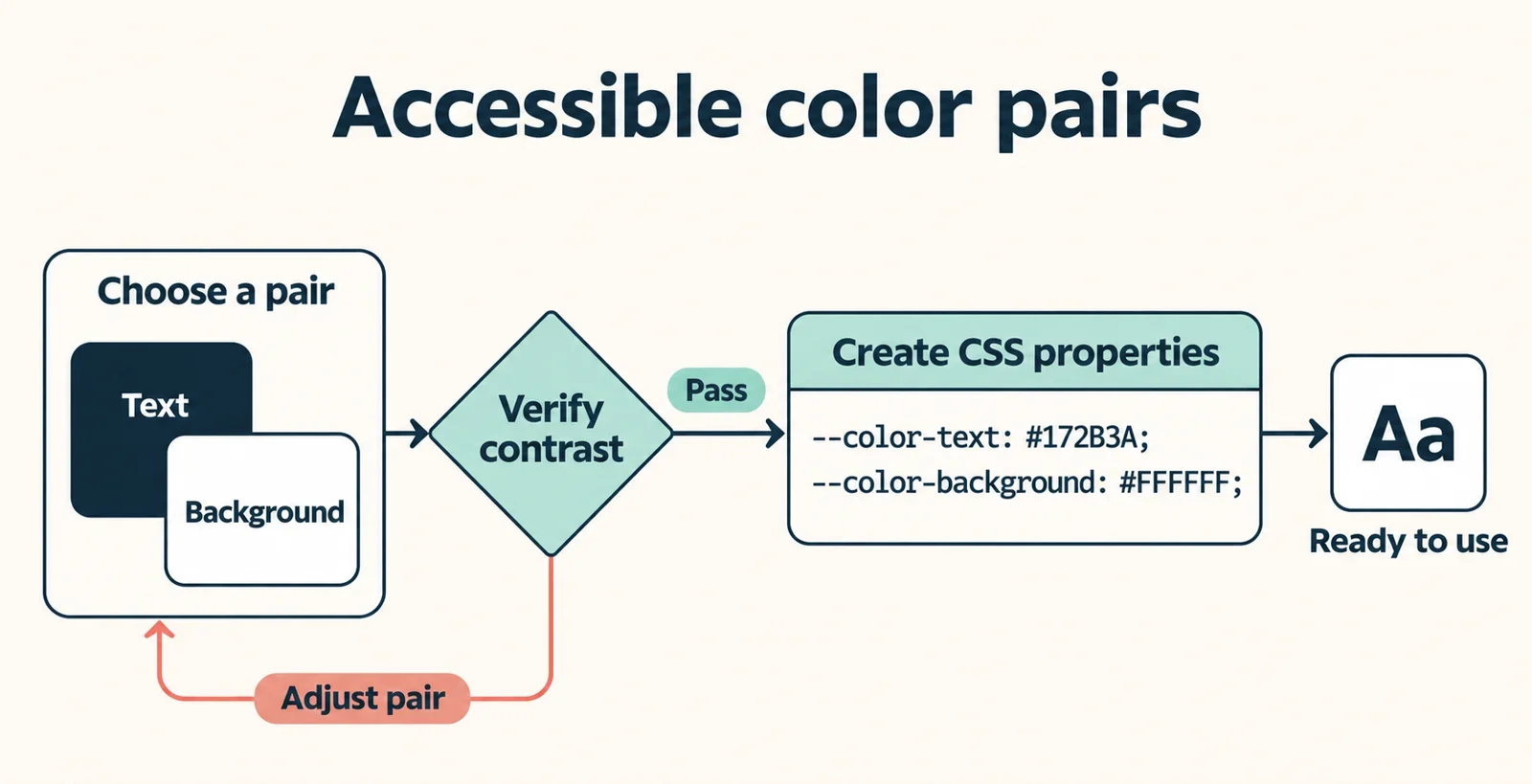
Accessible color pairs help text remain readable for more users, and reusable CSS custom properties keep those pairs consistent across a design system. PaletteBench offers three relevant tools: a color picker for choosing and inspecting shades, a palette generator for building four-color harmonies, and a contrast checker that tests text-background combinations against WCAG thresholds. A reader can use these tools together to verify a pair, record the passing values, and then manually write CSS custom properties for later reuse. Before starting, readers should understand that the workflow described here is largely manual. The sources outline PaletteBench tool behavior but do not show an export-to-CSS button, a saved-palettes feature, or account-based persistence. Each step below separates what PaletteBench appears to support from what the reader must do independently in their own stylesheet.
PaletteBench tools relevant to saving color pairs
Color picker
The color picker lets users choose a shade or enter a value and shows HEX, RGB, and HSL values that stay in sync as the selection changes. One example selected color given in the source material is #4338CA. This tool is useful for isolating an individual text or background color before testing it against another color. It does not, by itself, verify whether a pairing is accessible or produce CSS custom properties.
Palette generator
The palette generator builds four-color harmonies from a starting color. It supports complementary, analogous, triadic, and tetradic schemes and lets users lock swatches so they remain fixed through scheme changes and randomization. This can help designers explore candidate colors efficiently, but it does not replace contrast testing: a harmonious palette is not automatically an accessible palette.
Contrast checker
The contrast checker accepts text color and background color in HEX and tests the pairing against WCAG AA and AAA thresholds for normal and large text. It is the key tool for deciding whether a color pair is usable before saving it as a custom property. Readers should enter both colors, review the pass/fail result, and then manually record the HEX values if the pair passes at the desired level.
What is evidenced versus what is general CSS knowledge
PaletteBench facts cover tool inputs, outputs, and behavior such as synced HEX/RGB/HSL values, four-color harmony generation, locked swatches, and WCAG testing. Statements about custom property syntax, the cascade, inheritance, fallback values, and limitations of var() come from CSS documentation and are not claims that PaletteBench generates this CSS. Readers should treat the two categories separately: use PaletteBench to verify colors, then apply CSS knowledge to declare and consume custom properties in their own code.
WCAG contrast thresholds shown by PaletteBench
Normal text thresholds
Normal text needs a contrast ratio of 4.5:1 to pass WCAG AA and 7:1 to pass WCAG AAA. These thresholds apply when text is smaller than the large-text definitions described below.
Large text thresholds
Large text is defined as 18 point or 14 point bold. For large text, WCAG AA requires 3:1 and WCAG AAA requires 4.5:1. Because large text is easier to read at lower contrast, the passing thresholds are lower than those for normal text.
Anchoring verification to specific ratios
When using the contrast checker, readers should record not only whether a pair passes but also the exact ratio and the target level. A pair that passes normal-text AA at 4.5:1 may fail normal-text AAA at 7:1. Conversely, a pair that passes large-text AAA at 4.5:1 may still fail normal-text AA. If a design uses mixed text sizes, the safest approach is to verify the pair against the strictest intended context before saving it as a reusable custom property.
Example from the source
The source reports that white on #4338CA measures 7.90:1 and passes normal-text AA and AAA. This is an illustrative measured result, not a guarantee that every white-on-purple pairing will behave identically in every rendering context. Readers should still enter their own exact HEX values into the contrast checker and confirm the result before declaring the pair in CSS.
Declaring CSS custom properties for color pairs
Basic syntax
Custom properties use two dashes as a prefix, such as –primary-color, and are referenced with the var() function. Custom property names are case sensitive, so –Primary-Color and –primary-color are treated as different properties. A reader saving a verified text-background pair might declare two properties on :root:
:root {
  --color-text-primary: #ffffff;
  --color-bg-primary: #4338ca;
}
Where to declare
Custom properties are subject to the cascade and inherit from their parent. Declaring them on :root makes them globally available throughout the document. For smaller scopes, properties can be declared on a component class or other selector so they apply only within that subtree. Readers should choose the scope based on whether the color pair is a design-system-wide token or a component-specific override.
Referencing with var()
Use var() to consume a custom property in another declaration:
.button {
  color: var(--color-text-primary);
  background-color: var(--color-bg-primary);
}
The var() function supports fallback values, which are used if the custom property is invalid or not set. The initial-value of @property can also serve as a fallback when no value is set. Fallbacks are optional but can help protect against missing tokens during development.
What readers must not assume
Nothing in the PaletteBench sources indicates that the site generates CSS custom property declarations, copy-as-CSS output, or exportable variable blocks. The reader must manually write the declarations based on the HEX values confirmed by the contrast checker.
Registering custom properties with @property
Syntax and descriptors
@property registers a custom property with explicit type information. The basic structure includes the property name and descriptors such as inherits and initial-value. For example:
@property --color-text-primary {
  syntax: '<color>';
  inherits: false;
  initial-value: #000000;
}
Why registration matters
Registration enables typed custom properties, meaning the browser treats the value as a specific CSS type rather than an opaque token. This can support smoother transitions and animations and makes fallback behavior more predictable through the initial-value descriptor. For static design-system color pairs, simple double-dash declarations on :root are often sufficient; registration is an enhancement rather than a requirement.
inheritance behavior
The inherits descriptor controls whether the custom property inherits from parent elements when no value is set on a child. Setting inherits: false means the property uses its initial value on elements that do not explicitly set it, while inherits: true allows normal inheritance. Readers should match this setting to how they intend the color pair to propagate through the DOM.
Practical recommendation
Start with unregistered custom properties for color tokens. Add @property registration only if the project needs typed values, animated transitions between colors, or stricter fallback behavior. Do not assume PaletteBench generates or manages @property rules; all registration is written manually in the reader’s stylesheet.
Workflow from verified pair to reusable CSS custom property
Step 1: Choose candidate colors
Use the color picker to select or enter a text color and a background color. The picker shows HEX, RGB, and HSL values that stay in sync, so record the HEX representation for each candidate. Alternatively, use the palette generator to produce a four-color harmony and pick swatches from the result, locking any colors you want to keep while exploring other schemes.
Step 2: Check contrast
Open the contrast checker and enter the text color and background color in HEX. Review the result against WCAG AA and AAA thresholds for normal and large text:
| Text size | AA threshold | AAA threshold |
|---|---|---|
| Normal | 4.5:1 | 7:1 |
| Large (18 pt or 14 pt bold) | 3:1 | 4.5:1 |
If the pair passes the level you need, record both HEX values and the measured ratio. If it fails, adjust one or both colors in the picker or generator and retest.
Step 3: Declare custom properties
Manually write CSS custom properties on :root or an appropriate scoped selector using the verified HEX values:
:root {
  --color-text-primary: #ffffff;
  --color-bg-primary: #4338ca;
}
Step 4: Apply with var()
Reference the properties where needed:
.button-primary {
  color: var(--color-text-primary);
  background-color: var(--color-bg-primary);
}
Step 5: Decide on registration
If the tokens are static design-system values, unregistered custom properties are sufficient. Add @property only when typed values, initial-value fallbacks, or animated color transitions are required.
Step 6: Maintain manually
Because PaletteBench does not evidencedly save palettes or export CSS, readers should keep their custom properties in a version-controlled stylesheet or design-token file. Re-verify pairs in the contrast checker if colors are ever changed, since harmony does not guarantee accessibility.
What PaletteBench does not currently provide
No evidenced export or save features
The supplied source material does not describe a button or export option to copy a verified color pair as CSS custom properties. Readers should not expect PaletteBench to generate a downloadable CSS file, a copy-to-clipboard variable block, or direct integration with a stylesheet.
No evidenced saved palettes or persistence
There is no source-supported statement that users can save palettes or color pairs within PaletteBench for later reuse, nor any indication whether persistence would be browser-based or account-based. Until such a feature is documented, readers should treat PaletteBench as a verification tool and store approved pairs externally.
No evidenced copyable result block
The contrast checker is described as testing pairings against WCAG thresholds, but the sources do not state that it outputs a copyable result block containing exact HEX values and contrast ratios. Readers should manually record the passing values and ratios rather than assuming they can copy a formatted result.
Questions readers should answer before relying on the site
- Does PaletteBench provide a button or export option to copy a verified color pair as CSS custom properties?
- Can users save palettes or color pairs within PaletteBench for later reuse, and is persistence browser-based or account-based?
- Does the contrast checker output a copyable result block containing exact HEX values and contrast ratios?
- Are custom properties declared by users expected to be registered with @property, or is simple double-dash declaration sufficient for design-system color pairs?
- What naming convention should readers use when saving paired text and background colors as custom properties?
- How should a tutorial treat mid-tone colors where WCAG 2 and perceptual contrast algorithms may disagree?
Mid-tone consideration
The sources do not provide rules for resolving disagreements between WCAG 2 and perceptual contrast algorithms for mid-tone colors. Readers encountering such conflicts should check the latest WCAG guidance and consider testing the pair in actual rendering conditions rather than relying solely on one algorithm’s output.