Contents
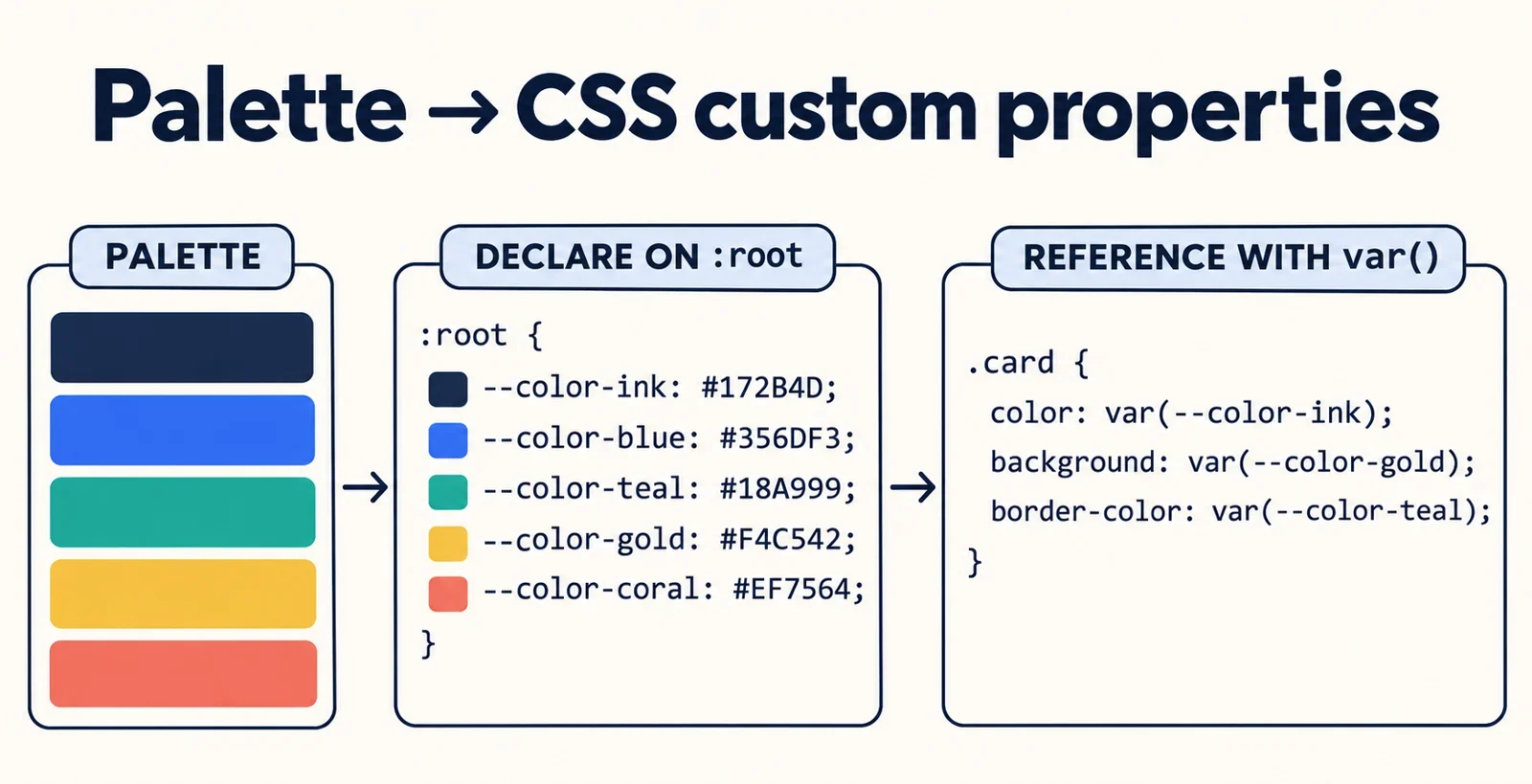
PaletteBench users can take chosen palette shades from tools such as the color picker and palette generator, then copy those values into CSS custom properties for reuse across a stylesheet. A custom property begins with two dashes, for example –primary-color, and is applied elsewhere with the var() function. Exporting a palette is only the first step; the exported values must remain syntactically valid, accessible against background colors, and appropriately scoped for the parts of the page where they will be used.
This repair-oriented guide explains what users supply to PaletteBench tools, what outputs can be captured directly, and which decisions affect whether exported values remain usable CSS. It also covers declaration placement, optional property registration with @property, and quality checks to perform before publishing CSS. AI-generated illustrations are used only to illustrate concepts and are not evidence of specific PaletteBench interface behavior.
Palette selection and export flow
The first step is choosing the shades that will become reusable variables. The color picker lets users choose a shade or enter a value, with HEX, RGB, and HSL values staying in sync, and provides a live color preview and copy output. This means the value shown after copying is the candidate text to place inside a custom property declaration.
Users should lock in the palette generator settings they intend to export before copying values. Randomization can change swatches after export, so any value copied while the generator is still randomizing may no longer match the visible palette when the CSS is later reviewed. If a swatch is locked, it should remain stable while other colors are regenerated; unlocked swatches may change on the next randomization pass.
Outputs that can be copied directly into CSS custom property values are the color strings presented by the tool, such as HEX, RGB, or HSL strings. A user can copy one of these strings and place it after the property name and colon, for example –brand-blue: #4338CA. Users should confirm which format their stylesheet already uses before choosing what to copy, because mixing formats across a palette can make later maintenance harder.
Decisions that affect validity include whether the copied string is complete and correctly formatted for CSS. A truncated HEX value, a missing hash symbol, or an out-of-range RGB number will not become a valid custom property value simply because it was copied from a tool. Before pasting into CSS, check that the full value is visible and that no preview-only label or unit has been included.
After copying, place the declaration in a scope that matches where the palette will be consumed. Declaring on :root makes the variable available throughout the document, while scoping it to a component selector limits availability to matching elements and their descendants. The choice affects both reuse and the risk of accidental overrides.
CSS custom property declaration rules
Custom properties are declared with a two-dash prefix, such as –primary-color: blue, and referenced with var(), such as color: var(–primary-color). The double dash distinguishes custom properties from standard CSS properties and signals to the browser that the author is defining an author-controlled variable.
Custom property names are case sensitive, so –my-color and –My-color are separate properties. When exporting a palette from PaletteBench, users should decide on one casing convention and apply it consistently across all variables. A stylesheet that mixes –accent-color and –Accent-Color will treat them as different variables, which can cause values to appear missing even though a similarly named variable exists.
Declaration placement controls scope. Variables declared on :root are available to every element in the document, which suits global palette tokens such as brand colors, neutral backgrounds, and text shades. Variables scoped to a component selector are available only to matching elements and their descendants, which suits component-specific accent or state colors. Scoped variables can override same-named root variables within that component without affecting the rest of the page.
The var() function can be used in any part of a property value on an element, but not for property names, selectors, media queries, or container queries. This means a palette variable can replace a color value inside color, background-color, border-color, and similar declarations, but cannot be used to write something like var(–prop-name): value or @media (min-width: var(–breakpoint)). When referencing palette variables, write the variable name exactly as declared, including case and dashes.
Each exported palette value should be checked as a complete CSS value before the declaration is saved. If a tool output includes explanatory text, sliders, or UI labels around the color string, copy only the color value itself, not the surrounding interface text.
Registered properties with @property
Registering a custom property with @property is optional for most palette exports. A plain custom property can be declared and referenced with var() without any registration, and it will behave according to normal custom property rules: invalid values are treated as invalid at computed-value time, and inheritance follows the inherits default for custom properties.
When registration is chosen, CSS.registerProperty registers a custom property with name, syntax, inherits, and initialValue; once registered, re-registering with JavaScript throws an error. This means a palette property should typically be registered once per document or module lifecycle. Attempting to register the same name again later will throw, so code that runs on every page load should guard against duplicate registration or check whether registration already occurred.
Required descriptors in registration include the property name, syntax string, inheritance flag, and initial value. For color palette tokens, syntax might restrict the property to color values, initialValue sets the fallback used before the variable is defined, and inherits determines whether descendant elements inherit the registered value. Registration is especially useful when a custom property needs type checking or animation support, because the browser can validate the value against the declared syntax and interpolate between values during transitions.
When an exported custom property value is invalid for its declared @property syntax, the declaration is treated as invalid at computed-value time and the initialValue or inherited value is used instead, depending on the registration settings. The invalid value does not silently become valid, nor does it necessarily fall back to the next var() fallback unless the property itself is undefined on that element.
Users exporting palettes should decide whether the benefits of type checking and animation justify the extra setup. For static brand colors and simple theme tokens, unregistered custom properties are usually sufficient. For design-system tokens that are animated or validated programmatically, @property registration provides stricter behavior at the cost of a one-time registration step and the no-re-registration restriction.
Quality checks before publishing CSS
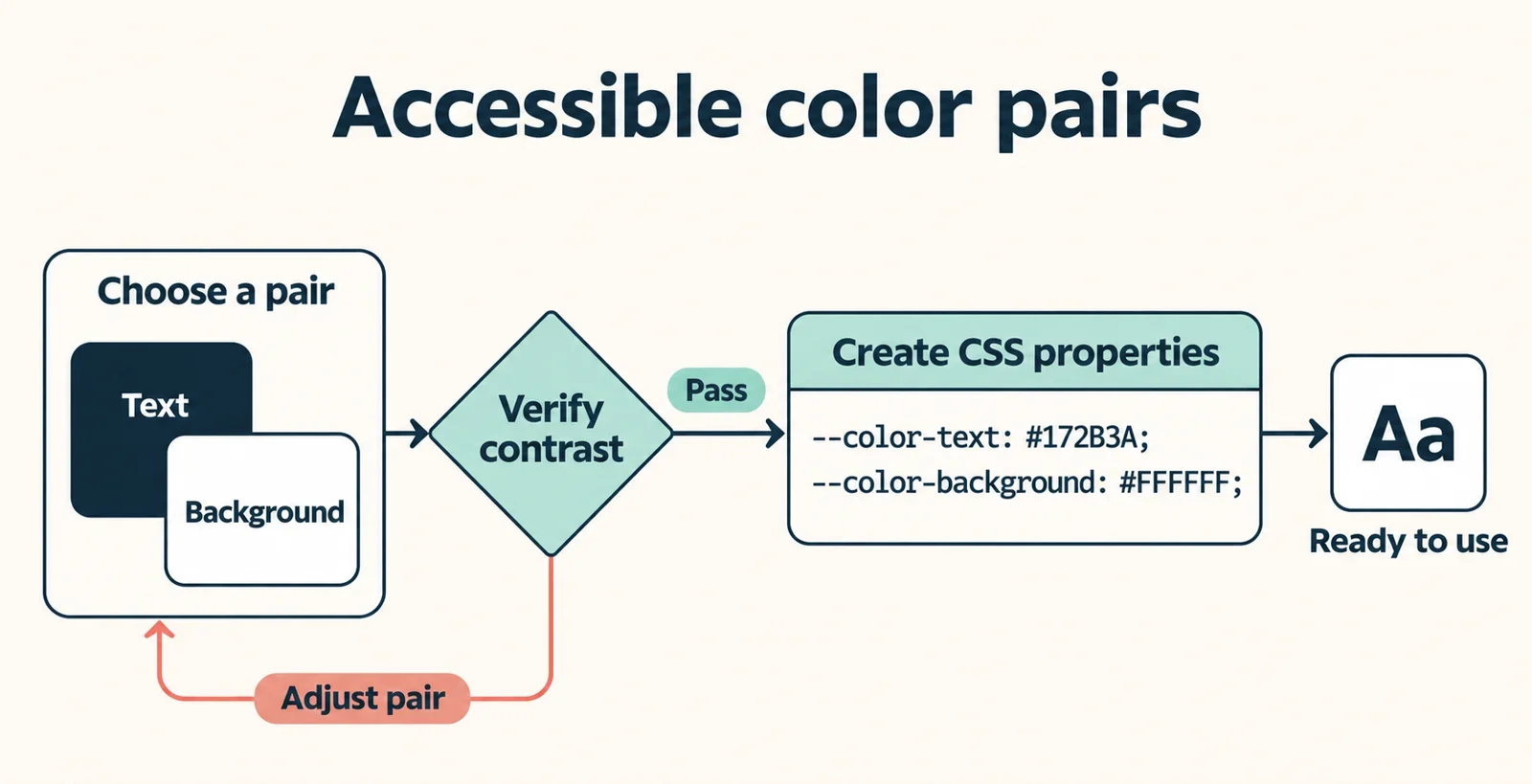
Before publishing CSS that uses exported palette variables, verify contrast, syntax, inheritance, and fallback behavior. The contrast checker tests a text and background HEX pairing against WCAG AA and AAA thresholds: normal text needs 4.5:1 for AA and 7:1 for AAA; large text needs 3:1 for AA and 4.5:1 for AAA. For example, white on #4338CA measures 7.90:1 and passes normal-text AA and AAA contrast in PaletteBench documentation. This means a text-background pair can be declared as CSS variables only after confirming that the foreground and background combination meets the intended threshold for the text size in use.
Syntax validity should be checked for every copied value. A HEX string needs the leading hash and the correct number of digits; RGB and HSL values need correct ranges and punctuation. Even if PaletteBench copies a value cleanly, pasting it into the wrong context or truncating it during copy can break the declaration.
Inheritance behavior matters because custom properties declared on an element are inherited by descendants unless overridden. A palette variable set on :root will flow into all components unless a component resets it. If a variable is intended to be component-only, scope it to that component’s selector rather than relying on default inheritance from root.
Fallback values can be defined for custom properties using the var() function. A fallback is a second argument to var(), such as color: var(–primary-color, navy). If the referenced custom property is undefined or invalid on that element, the browser uses the fallback instead. Fallbacks should be chosen carefully: a dark foreground fallback may be unreadable on a dark background, so pair fallback foreground and background values as carefully as the primary variables.
When checking pairing accessibility, test both the primary color and its likely fallback against each background where the variable may appear. A variable that passes on a light page background may fail when used inside a dark card or banner. Verify normal and large text separately, because the thresholds differ. Large text is generally easier to read at lower contrast, but the exact size threshold should be confirmed against current WCAG guidance before relying on the large-text allowance.
A final publication checklist might include: confirming each copied value is complete and correctly formatted, checking each text-background pair against the applicable AA or AAA threshold, confirming custom property names use consistent casing, deciding whether @property registration is needed, and adding var() fallbacks that remain readable on every background where the variable may render.